
Collage Maker & Photo Editor9.9.1.7 - Google Play
You'll be able to see results in few seconds.
Publisher Description


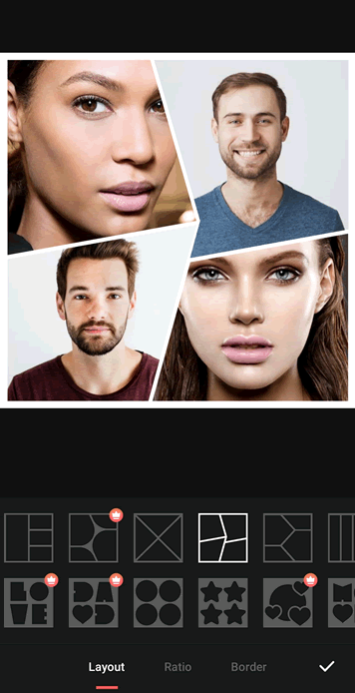

Love collage maker: 1000+ layout, grid, sticker, text, background, frame, cutout
Collage Maker & Photo Editoris a powerful and easy-to-use photo collage maker and photo editing app. Just select some images you love and easily arrange them in a perfect layout. Remove photo backgrounds with AI cutout, edit pictures with filters and effects, and share perfect posts, stories and carousels to Instagram, TikTok and WhatsApp.
FotoCollage will be your favorite collage maker and photo editor.
Key Features:
• 1000+ collage layouts & photo grids: mix up to 100 photos, including heart and shape collages
• AI cutout & background remover: cut out people or objects in one tap
• Photo frames, 500+ stickers and emoji, and custom text with fonts, gradients and shadows
• Backgrounds: blur, gradient, solid color and cute patterns
• Photo editor: filters, effects, sharpness, shadow, crop, rotate and mirror
• Scrapbook, birthday, wedding and holiday collage templates
• Save in HD and share to Instagram, Facebook, TikTok and WhatsApp
⭐
1000+ Layouts
Choose from 1000+ popular layouts and photo grids. Mix up to 100 photos in one collage, adjust borders, corners and spacing, and make shaped collages such as hearts or diamonds. Whether you want a simple 2-photo grid or a big photo wall, there is a layout for it.
⭐
Collage Templates
Start fast with ready-made templates for birthdays, weddings, travel, scrapbooks, holidays and more. Just drop in your photos and your collage is ready to share. New templates are added regularly to stay on trend.
⭐
AI Cutout
Remove photo backgrounds with one tap. AI cutout detects people, pets and objects, so you can erase the background, swap in a new one, or place your cutout into a collage. Make clean stickers, profile photos and creative edits in seconds, no editing skills needed.
⭐
Powerful Photo Editor
Edit photos with one-tap filters and effects, and fine-tune brightness, contrast, warmth, sharpness and shadow. Crop, rotate, mirror and flip, blur the background, or add solid color, gradient and cute pattern backgrounds. Make people, pets and food in your pics look perfect.
⭐
Funny Materials
Tons of fun materials to play with: 500+ stickers, emojis and makeup stickers, cute pattern backgrounds, and custom text in your favorite fonts, colors and shadows. Add a festive touch to every photo, with new materials added regularly to stay on trend.
With FotoCollage photo editor, create your perfect photo collage with a wide variety of layouts, stickers, frames, and backgrounds, and become the focus of attention among friends on TikTok, WhatsApp, Instagram, Facebook, and more. Try it out and have a wonderful time with FotoCollage!
Enjoy making amazing photo collages and editing your photos with the best
FotoCollage
.
If you have any suggestions, feel free to contact us at connect.fotocollage@outlook.com
About Collage Maker & Photo Editor
How to install Collage Maker & Photo Editor on your Android device:
- Click on the Continue To App button on our website. This will redirect you to Google Play.
- Once the Collage Maker & Photo Editor is shown in the Google Play listing of your Android device, you can start its download and installation. Tap on the Install button located below the search bar and to the right of the app icon.
- A pop-up window with the permissions required by Collage Maker & Photo Editor will be shown. Click on Accept to continue the process.
- Collage Maker & Photo Editor will be downloaded onto your device, displaying a progress. Once the download completes, the installation will start and you'll get a notification after the installation is finished.
Program Details
System requirements
Download information
Pricing
Version History
version 9.9.1.7
posted on 2026-10-11
✨ FotoCollage just got a major update! Explore new AI-powered creative tools~
- 🪄 New AI Creative Hub! AI Image Generation, AI Eraser, AI Stylization, and more;
- 🖼️ New outline styles for layouts! Add extra detail to your collages;
- 🎨 New Out-of-Frame effect! Make photos pop beyond the borders;
- ✨ Adjust transparency for stickers, text, and photos;
- 🖌️ New custom shape cropping for brushes;
version 9.8.1.4
posted on 2026-10-11
✨ Update!
- 🔍 Background search added, quickly find the perfect background
- ✏️ Sticker stroke support for better styling
- 🎨 New torn paper stroke effect added
version 9.6.2.3
posted on 2026-07-11
✨ Big update!
- 🔍 Sticker search is here! Quickly find stickers from a huge collection
- ✏️ Text fully optimized! Supports double stroke, color palette, and background effects
- 🖼️ Added layer support for collage and single images, more flexible editing
- 🎨 Filters can now be applied to all images with one tap
version 9.5.3.2
posted on 2026-06-05
✨ Big update! New creative text features~
- ✨ Added Magic Text feature! Enter text and generate creative effects with one tap
- 🎬 Optimized Animated Collage feature
- 🛠️ Fixed some issues for a smoother experience
version 9.5.2
posted on 2026-06-02
✨ Big update! Get creative and have fun~
- ✨ Text templates are here! Multiple beautiful design templates, apply with one tap
- 📝 New Text Bending feature! Bend text freely for more creative layouts
- 🎬 Animated Collage experience optimized! Smoother operation
version 9.4.1.3
posted on 2026-05-03
✨ Big update! Check out what's new:
- 🎬 Animated Collage is here! Add photos and create animated collage videos with one tap
- 😊 Smart Face Centering! Auto-detects and centers faces in collages—no more cut-off faces
- 📐 More layouts added!
version 9.3.1.1
posted on 2026-04-03
What's new:
- Added Undo/Redo feature for more flexible editing.
Improvements:
- 🛠️Fixed bugs and improved performance
version 9.2.1.1
posted on 2026-03-17
What's new:
- Gallery Optimization: New location memory feature makes finding photos faster and easier.
- Material Store: Browsing progress for stickers, backgrounds, and themes is now saved for a smoother experience.
Improvements:
- Fixed bugs and improved performance.
version 8.12.2.3
posted on 2026-01-27
What's new:
- 🎄 New rich Christmas materials added – unlock more inspiration for your holiday creations!
Improvements:
- Fixed bugs and improved performance.
version 8.11.1.1
posted on 2025-12-05
What's new:
- Added more new materials for baby and graduation season themes.
- Optimized the use of theme templates.
Improvements:
- Fixed bugs and improved performance.
Disclaimer
Official Google Play Link
We do not host Collage Maker & Photo Editor on our servers. We did not scan it for viruses, adware, spyware or other type of malware. This app is hosted by Google and passed their terms and conditions to be listed there. We recommend caution when installing it.
The Google Play link for Collage Maker & Photo Editor is provided to you by apps112.com without any warranties, representations or guarantees of any kind, so access it at your own risk.
If you have questions regarding this particular app contact the publisher directly. For questions about the functionalities of apps112.com contact us.
